
Hello Folks! We all know that web application development is so vast and the technology is changing day by day with fast pace. We have many frameworks which ease our life with too many ready to use libraries, like Angular, Vue, React and so on with momentJS, Luxon etc.
Along with the JavaScript frameworks, to make the look & feel better, we have lot of CSS frameworks too like Skeleton CSS, Angular Material Design, Bootstrap-UI (bootstrap for angular) and so on.
Bootstrap 5
But out of all these, my favorite still remains to be the ‘Bootstrap’! Yes! You read it right. I have been using Bootstrap since Bootstrap version 3 and now we have Bootstrap version 5 as the latest.
There are many new features; even you will fall in love with this latest Bootstrap version!
Let’s not discuss all of those here, as those are already available in detail here in the official Bootstrap blog.
There are 2-3 main reasons that still made me ‘Go To – Bootstrap 5’, though the app is not just a website but a full fledged web app based on Angular or React!
No jQuery!
The top one in the list is that – no more jQuery! Yay! We always heard about the advice that, its not good to use jQuery with Angular!
Yes, so currently, Bootstrap uses JavaScript and a lighter JS /positioning engine called Popper for its Tooltip and popover positioning.
So, now Bootstrap has lighter source files and faster page load time. This means that, our app loads faster!
Form Control
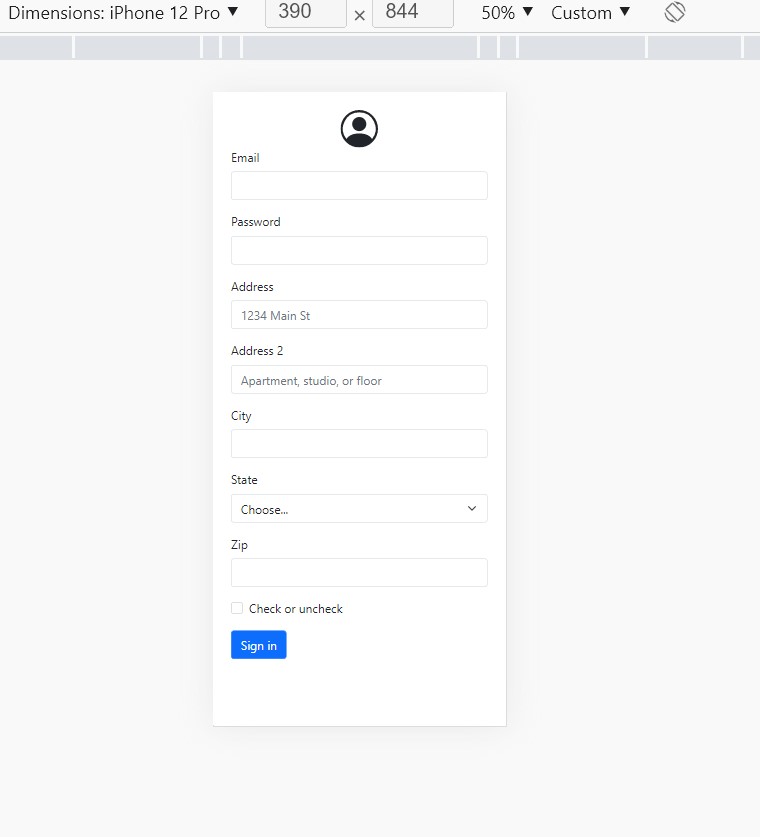
Another important upgrade is that, improved Form Control. Now, the form controls like checkbox, radio buttons etc. do not differ in their look and feel based on browser, instead, seen uniform across!
Just run the below address form control code and experience it yourself!
Snippet:
<!doctype html> <html lang=”en”> <head> <!– Required meta tags –> <meta charset=”utf-8″> <meta name=”viewport” content=”width=device-width, initial-scale=1″> <!– Bootstrap CSS –> <link href=”https://cdn.jsdelivr.net/npm/bootstrap@5.0.2/dist/css/bootstrap.min.css” rel=”stylesheet” integrity=”sha384-EVSTQN3/azprG1Anm3QDgpJLIm9Nao0Yz1ztcQTwFspd3yD65VohhpuuCOmLASjC” crossorigin=”anonymous”> <!– JS –> <script src=”https://cdn.jsdelivr.net/npm/bootstrap@5.0.2/dist/js/bootstrap.bundle.min.js”></script> </head> <body> <div class=”m-4″> <svg xmlns=”http://www.w3.org/2000/svg” width=”50″ height=”50″ display=”block” margin=”auto” fill=”currentColor” class=”bi bi-person-circle” viewBox=”0 0 16 16″> <path d=”M11 6a3 3 0 1 1-6 0 3 3 0 0 1 6 0z”></path> <path fill-rule=”evenodd” d=”M0 8a8 8 0 1 1 16 0A8 8 0 0 1 0 8zm8-7a7 7 0 0 0-5.468 11.37C3.242 11.226 4.805 10 8 10s4.757 1.225 5.468 2.37A7 7 0 0 0 8 1z”></path> </svg> <form class=”row g-3″> <div class=”col-md-6″> <label for=”inputEmail4″ class=”form-label”>Email</label> <input type=”email” class=”form-control” id=”inputEmail4″> </div> <div class=”col-md-6″> <label for=”inputPassword4″ class=”form-label”>Password</label> <input type=”password” class=”form-control” id=”inputPassword4″> </div> <div class=”col-12″> <label for=”inputAddress” class=”form-label”>Address</label> <input type=”text” class=”form-control” id=”inputAddress” placeholder=”1234 Main St”> </div> <div class=”col-12″> <label for=”inputAddress2″ class=”form-label”>Address 2</label> <input type=”text” class=”form-control” id=”inputAddress2″ placeholder=”Apartment, studio, or floor”> </div> <div class=”col-md-6″> <label for=”inputCity” class=”form-label”>City</label> <input type=”text” class=”form-control” id=”inputCity”> </div> <div class=”col-md-4″> <label for=”inputState” class=”form-label”>State</label> <select id=”inputState” class=”form-select”> <option selected>Choose…</option> <option>Karnataka</option> <option>Kerala</option> <option>Maharashtra</option> <option>Andhra Pradesh</option> </select> </div> <div class=”col-md-2″> <label for=”inputZip” class=”form-label”>Zip</label> <input type=”text” class=”form-control” id=”inputZip”> </div> <div class=”col-12″> <div class=”form-check”> <input class=”form-check-input” type=”checkbox” id=”gridCheck”> <label class=”form-check-label” for=”gridCheck”> Check or uncheck </label> </div> </div> <div class=”col-12″> <button type=”submit” class=”btn btn-primary”>Sign in</button> </div> </form> </div> </body> </html> Output Screenshot:
SVG
I hope, in the above example, you might have noticed some svg content. Yes! Bootstrap 5 now has its own icon support as well.
You can simply copy paste the svg or you can download or deliver from CDN per your choice or install using npm.
As these icons are SVG images, they scale and can be styled with CSS.
Updates in 5.2.0
Following are the 2 much awaited updates which will really help the developers in 5.2.0 –
- Tabs do not autofocus and cause pages to jump.
- Fix .active class toggling of tabs within dropdowns
Also another nice upcoming feature in next release –
Dark mode and more color modes & I am curious about – the sticky headers for tables!
Final Thoughts
Though Bootstrap 5 was officially released on May 5, 2021; I am not sure why is it still not used extensively like earlier.
Its way lighter and very much improved. I think once you start using it, you will realize the beauty of it.
Its always good to use lightweight frameworks and the ones with easier learning curve. Keep your App Simple and Developer friendly too, like the user-friendly!
Bootstrap also has extensive documentation to learn on own. So go ahead and start your web app today!